alphaTab.DisplaySettings
The display settings control how the general layout and display of alphaTab is done.
class DisplaySettingsProperties
accoladeBarPaddingRight
The padding between the accolade bar and the start of the bar itself.
- JavaScript
- C#
- Kotlin
accoladeBarPaddingRight: number = 3;double AccoladeBarPaddingRight { get; set; } = 3var accoladeBarPaddingRight: Double = 3barCount
The total number of bars that should be rendered from the song. (-1 for all bars) This setting sets the number of bars that should be rendered from the overall song. This setting can be used to achieve a paging system or to only show partial bars of the same file. By this a tutorial alike display can be achieved that explains various parts of the song. Demo
- JavaScript
- C#
- Kotlin
barCount: number = -1;double BarCount { get; set; } = -1var barCount: Double = -1barCountPerPartial
The number of bars that should be placed within one partial render. AlphaTab renders the whole music sheet in smaller chunks named "partials". This is to reduce the risk of encountering browser performance restrictions and it gives faster visual feedback to the user. This setting controls how many bars are placed within such a partial.
- JavaScript
- C#
- Kotlin
barCountPerPartial: number = 10;double BarCountPerPartial { get; set; } = 10var barCountPerPartial: Double = 10barsPerRow
Limit the displayed bars per system (row). (-1 for automatic mode) This setting sets the number of bars that should be put into one row during layouting. This setting is only respected
when using the Page where bars are aligned in systems. Demo.
- JavaScript
- C#
- Kotlin
barsPerRow: number = -1;double BarsPerRow { get; set; } = -1var barsPerRow: Double = -1effectBandPaddingBottom
The padding between individual effect bands.
- JavaScript
- C#
- Kotlin
effectBandPaddingBottom: number = 2;double EffectBandPaddingBottom { get; set; } = 2var effectBandPaddingBottom: Double = 2effectStaffPaddingBottom
The bottom padding applied to effect annotation staffs.
- JavaScript
- C#
- Kotlin
effectStaffPaddingBottom: number = 0;double EffectStaffPaddingBottom { get; set; } = 0var effectStaffPaddingBottom: Double = 0effectStaffPaddingTop
The top padding applied to effect annotation staffs.
- JavaScript
- C#
- Kotlin
effectStaffPaddingTop: number = 0;double EffectStaffPaddingTop { get; set; } = 0var effectStaffPaddingTop: Double = 0firstNotationStaffPaddingTop
The top padding applied to the first main notation staff (standard, tabs, numbered, slash).
- JavaScript
- C#
- Kotlin
firstNotationStaffPaddingTop: number = 0;double FirstNotationStaffPaddingTop { get; set; } = 0var firstNotationStaffPaddingTop: Double = 0firstStaffPaddingLeft
The left padding applied between the left line and the first glyph in the first staff in a system.
- JavaScript
- C#
- Kotlin
firstStaffPaddingLeft: number = 6;double FirstStaffPaddingLeft { get; set; } = 6var firstStaffPaddingLeft: Double = 6firstSystemPaddingTop
The top padding applied to first system.
- JavaScript
- C#
- Kotlin
firstSystemPaddingTop: number = 0;double FirstSystemPaddingTop { get; set; } = 0var firstSystemPaddingTop: Double = 0justifyLastSystem
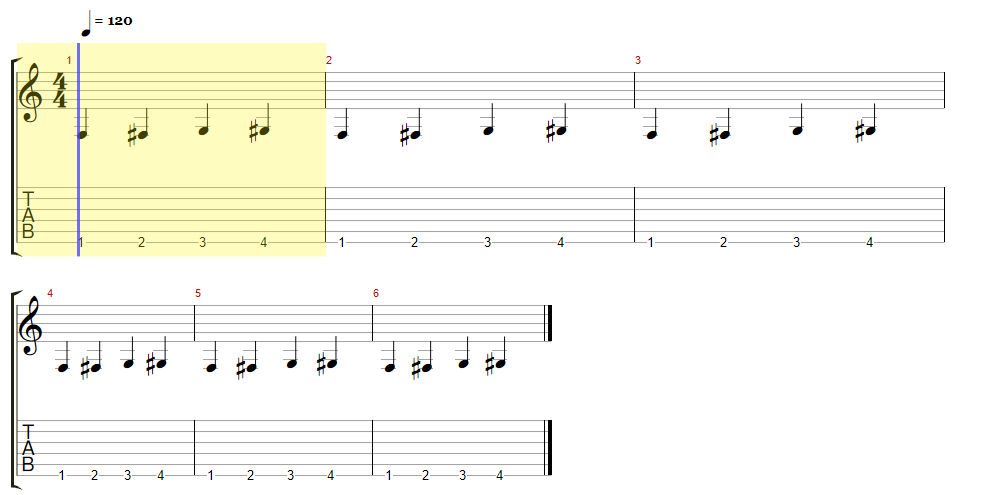
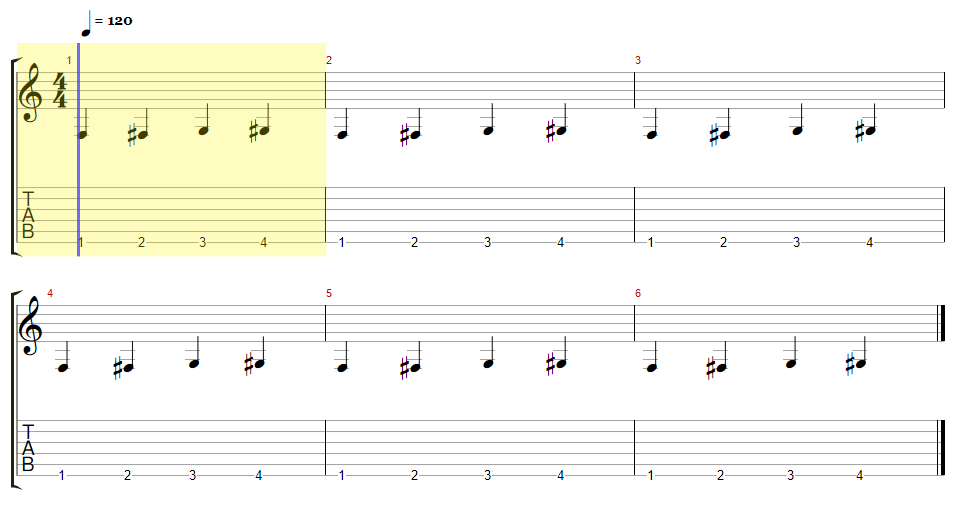
Whether to justify also the last system in page layouts. Setting this option to true tells alphaTab to also justify the last system (row) like it
already does for the systems which are full.
| Justification Disabled | Justification Enabled |
|---|---|
 |  |
- JavaScript
- C#
- Kotlin
justifyLastSystem: boolean = false;bool JustifyLastSystem { get; set; } = falsevar justifyLastSystem: Boolean = falselastNotationStaffPaddingBottom
The bottom padding applied to last main notation staff (standard, tabs, numbered, slash).
- JavaScript
- C#
- Kotlin
lastNotationStaffPaddingBottom: number = 0;double LastNotationStaffPaddingBottom { get; set; } = 0var lastNotationStaffPaddingBottom: Double = 0lastSystemPaddingBottom
The bottom padding applied to the last system.
- JavaScript
- C#
- Kotlin
lastSystemPaddingBottom: number = 5;double LastSystemPaddingBottom { get; set; } = 5var lastSystemPaddingBottom: Double = 5layoutMode
The layouting mode used to arrange the the notation. AlphaTab has various layout engines that arrange the rendered bars differently. This setting controls which layout mode is used.
- JavaScript
- C#
- Kotlin
layoutMode: LayoutMode = LayoutMode.Page;LayoutMode LayoutMode { get; set; } = LayoutMode.Pagevar layoutMode: LayoutMode = LayoutMode.PagelyricLinesPaddingBetween
The additional padding to apply between multiple lyric lines.
- JavaScript
- C#
- Kotlin
lyricLinesPaddingBetween: number = 5;double LyricLinesPaddingBetween { get; set; } = 5var lyricLinesPaddingBetween: Double = 5notationStaffPaddingBottom
The bottom padding applied to main notation staves (standard, tabs, numbered, slash).
- JavaScript
- C#
- Kotlin
notationStaffPaddingBottom: number = 0;double NotationStaffPaddingBottom { get; set; } = 0var notationStaffPaddingBottom: Double = 0notationStaffPaddingTop
The top padding applied to main notation staves (standard, tabs, numbered, slash).
- JavaScript
- C#
- Kotlin
notationStaffPaddingTop: number = 0;double NotationStaffPaddingTop { get; set; } = 0var notationStaffPaddingTop: Double = 0padding
Adjusts the padding between the music notation and the border. Adjusts the padding between the music notation and the outer border of the container element. The array is either:
- 2 elements:
[left-right, top-bottom] - 4 elements:
[left, top, right, bottom]
- JavaScript
- C#
- Kotlin
padding: number[] = [35, 35];IList<double> Padding { get; set; } = [35, 35]var padding: alphaTab.collections.DoubleList = [35, 35]resources
Allows adjusting of the used fonts and colors for rendering. AlphaTab allows configuring the colors and fonts used for rendering via the rendering resources settings. Please note that as of today this is the primary way of changing the way how alphaTab styles elements. CSS styling in the browser cannot be guaranteed to work due to its flexibility.
Due to space reasons in the following table the common prefix of the settings are removed. Please refer to these examples to eliminate confusion on the usage:
| Platform | Prefix | Example Usage |
|---|---|---|
| JavaScript | display.resources. | settings.display.resources.wordsFont = ... |
| JSON | display.resources. | var settings = { display: { resources: { wordsFonts: '...'} } }; |
| JSON | resources. | var settings = { resources: { wordsFonts: '...'} }; |
| .net | Display.Resources. | settings.Display.Resources.WordsFonts = ... |
| Android | display.resources. | settings.display.resources.wordsFonts = ... |
Types
Fonts
For the JavaScript platform any font that might be installed on the client machines can be used. Any additional fonts can be added via WebFonts. The rendering of the score will be delayed until it is detected that the font was loaded. Simply use any CSS font property compliant string as configuration. Relative font sizes with percentual values are not supported, remaining values will be considered if supported.
since 1.2.3 Multiple fonts are also supported for the Web version. alphaTab will check if any of the fonts in the list is loaded instead of all. If none is available at the time alphaTab is initialized, it will try to initiate the load of the specified fonts individual through the Browser Font APIs.
For the .net platform any installed font on the system can be used. Simply construct the Font object to configure your desired fonts.
Colors
For JavaScript you can use any CSS font property compliant string. (#RGB, #RGBA, #RRGGBB, #RRGGBBAA, rgb(r,g,b), rgba(r,g,b,a) )
On .net simply construct the Color object to configure your desired color.
- JavaScript
- C#
- Kotlin
resources: RenderingResources = false;RenderingResources Resources { get; set; } = falsevar resources: RenderingResources = falsescale
The zoom level of the rendered notation. AlphaTab can scale up or down the rendered music notation for more optimized display scenarios. By default music notation is rendered at 100% scale (value 1) and can be scaled up or down by percental values.
- JavaScript
- C#
- Kotlin
scale: number = 1.0;double Scale { get; set; } = 1.0var scale: Double = 1.0staffPaddingLeft
The left padding applied between the left line and the first glyph in the following staff in a system.
- JavaScript
- C#
- Kotlin
staffPaddingLeft: number = 2;double StaffPaddingLeft { get; set; } = 2var staffPaddingLeft: Double = 2startBar
The bar start index to start layouting with. This setting sets the index of the first bar that should be rendered from the overall song. This setting can be used to achieve a paging system or to only show partial bars of the same file. By this a tutorial alike display can be achieved that explains various parts of the song. Please note that this is the bar number as shown in the music sheet (1-based) not the array index (0-based). Demo
- JavaScript
- C#
- Kotlin
startBar: number = 1;double StartBar { get; set; } = 1var startBar: Double = 1staveProfile
The stave profile defining which staves are shown for the music sheet. AlphaTab has various stave profiles that define which staves will be shown in for the rendered tracks. Its recommended
to keep this on Default and rather rely on the options available ob Staff level
- JavaScript
- C#
- Kotlin
staveProfile: StaveProfile = StaveProfile.Default;StaveProfile StaveProfile { get; set; } = StaveProfile.Defaultvar staveProfile: StaveProfile = StaveProfile.DefaultstretchForce
The default stretch force to use for layouting. The stretch force is a setting that controls the spacing of the music notation. AlphaTab uses a varaint of the Gourlay algorithm for spacing which has springs and rods for aligning elements. This setting controls the "strength" of the springs. The stronger the springs, the wider the spacing.
| Force 1 | Force 0.5 |
|---|---|
 |  |
- JavaScript
- C#
- Kotlin
stretchForce: number = 1;double StretchForce { get; set; } = 1var stretchForce: Double = 1systemLabelPaddingLeft
The padding left to the track name label of the system.
- JavaScript
- C#
- Kotlin
systemLabelPaddingLeft: number = 0;double SystemLabelPaddingLeft { get; set; } = 0var systemLabelPaddingLeft: Double = 0systemLabelPaddingRight
The padding left to the track name label of the system.
- JavaScript
- C#
- Kotlin
systemLabelPaddingRight: number = 3;double SystemLabelPaddingRight { get; set; } = 3var systemLabelPaddingRight: Double = 3systemPaddingBottom
The bottom padding applied to systems beside the last one.
- JavaScript
- C#
- Kotlin
systemPaddingBottom: number = 10;double SystemPaddingBottom { get; set; } = 10var systemPaddingBottom: Double = 10systemPaddingTop
The top padding applied systems beside the first one.
- JavaScript
- C#
- Kotlin
systemPaddingTop: number = 10;double SystemPaddingTop { get; set; } = 10var systemPaddingTop: Double = 10systemsLayoutMode
The mode used to arrange staves and systems. By default alphaTab uses an own (automatic) mode to arrange and scale the bars when putting them into staves. This property allows changing this mode to change the music sheet arrangement.
Supported File Formats:
- Guitar Pro 6-8 since 1.3.0 If you want/need support for more file formats to respect the sizing information feel free to open a discussion on GitHub.
Automatic Mode
In the automatic mode alphaTab arranges the bars and staves using its internal mechanisms.
For the page layout this means it will scale the bars according to the stretchForce and available width.
Wrapping into new systems (rows) will happen when the row is considered "full".
For the horizontal layout the stretchForce defines the sizing and no wrapping happens at all.
Model Layout mode
File formats like Guitar Pro embed information about the layout in the file and alphaTab can read and use this information. When this mode is enabled, alphaTab will also actively use this information and try to respect it.
alphaTab holds following information in the data model and developers can change those values (e.g. by tapping into the scoreLoaded) event.
Used when single tracks are rendered:
score.tracks[index].systemsLayout- An array of numbers describing how many bars should be placed within each system (row).score.tracks[index].defaultSystemsLayout- The number of bars to place in a system (row) when no value is defined in thesystemsLayout.score.tracks[index].staves[index].bars[index].displayScale- The relative size of this bar in the system it is placed. Note that this is not directly a percentage value. e.g. if there are 3 bars and all define scale 1, they are sized evenly.score.tracks[index].staves[index].bars[index].displayWidth- The absolute size of this bar when displayed.
Used when multiple tracks are rendered:
score.systemsLayout- Like thesystemsLayouton track level.score.defaultSystemsLayout- Like thedefaultSystemsLayouton track level.score.masterBars[index].displayScale- Like thedisplayScaleon bar level.score.masterBars[index].displayWidth- Like thedisplayWidthon bar level.
Page Layout
The page layout uses the systemsLayout and defaultSystemsLayout to decide how many bars go into a single system (row).
Additionally when sizing the bars within the system the displayScale is used. As indicated above, the scale is rather a ratio than a percentage value but percentages work also:
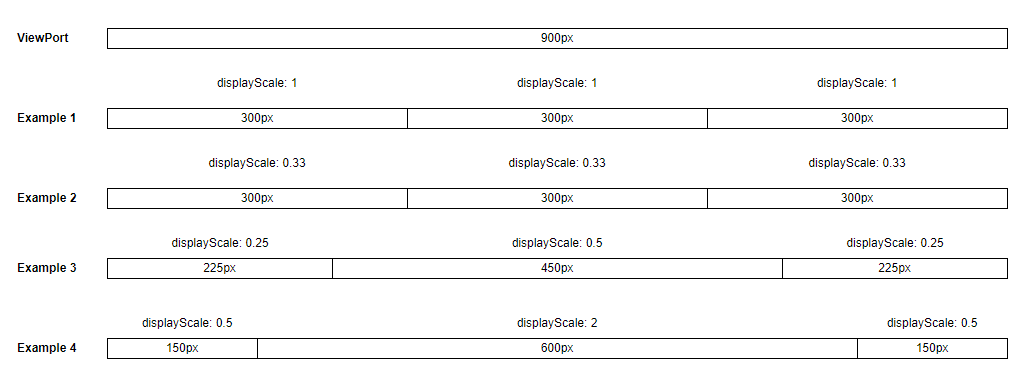
The page layout does not use displayWidth. The use of absolute widths would break the proper alignments needed for this kind of display.
Also note that the sizing is including any glyphs and notation elements within the bar. e.g. if there are clefs in the bar, they are still "squeezed" into the available size. It is not the case that the actual notes with their lengths are sized accordingly. This fits the sizing system of Guitar Pro and when files are customized there, alphaTab will match this layout quite close.
Horizontal Layout
The horizontal layout uses the displayWidth to scale the bars to size the bars exactly as specified. This kind of sizing and layout can be useful for usecases like:
- Comparing files against each other (top/bottom comparison)
- Aligning the playback of multiple files on one screen assuming the same tempo (e.g. one file per track).
- JavaScript
- C#
- Kotlin
systemsLayoutMode: SystemsLayoutMode = 1;SystemsLayoutMode SystemsLayoutMode { get; set; } = 1var systemsLayoutMode: SystemsLayoutMode = 1trackStaffPaddingBetween
The additional padding to apply between the staves of two separate tracks.
- JavaScript
- C#
- Kotlin
trackStaffPaddingBetween: number = 5;double TrackStaffPaddingBetween { get; set; } = 5var trackStaffPaddingBetween: Double = 5