Monaco Editor Integration
Monaco is the code editor that powers Visual Studio Code. It has no built-in support for language servers and ships its own APIs instead.
For a full-featured bridge you can use monaco-languageclient. For a lighter-weight path, alphaTab ships @coderline/alphatab-monaco.
This package wires Monaco to the alphaTab language server running inside a Web Worker, so the editor gets every feature the server provides.
This guide focuses on Monaco in a browser environment. It assumes your bundler resolves the imported dependencies.
This integration is still experimental. It works well with a single editor on the page. Complex layouts with multiple editors are not yet fully supported.
The alphaTab development playground uses this same module. Clone alphaTab, open it in VS Code (it compiles and starts the playground automatically), and open the alphaTex Editor from the menu.
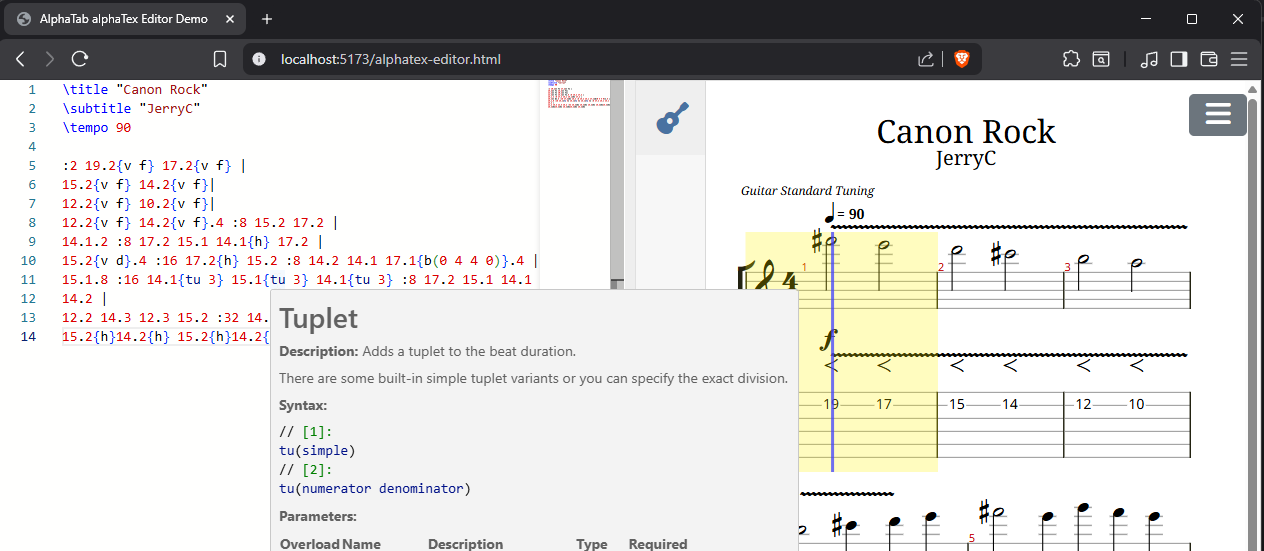
TextMate grammar
alphaTab ships a TextMate grammar, but Monaco does not consume TextMate grammars out of the box. Two Microsoft packages bridge the gap:
vscode-textmate— loads TextMate grammars.vscode-oniguruma— provides the Oniguruma regex engine that TextMate grammars rely on, via WebAssembly.
//
// Monaco editor worker (see Monaco docs)

// @ts-expect-error
import editorWorker from 'monaco-editor/editor/editor.worker?worker';
self.MonacoEnvironment = {
    getWorker: () => {
        return new editorWorker();
    }
};

//
// alphaTex Grammar Support
import { addTextMateGrammarSupport, registerAlphaTexGrammar } from '@coderline/alphatab-monaco';

// load the WebAssembly file (e.g. via ajax or other mechanisms)
// it is shipped together with the vscode-oniguruma NPM package
const onigurumaWasm: ArrayBuffer = await load(new URL('vscode-oniguruma/release/onig.wasm', import.meta.url));

// Setup general textmate grammar support (also other grammars beside alphaTex could be used)
const textMateSupport = addTextMateGrammarSupport(onigurumaWasm);

// Register the alphaTex grammar
await registerAlphaTexGrammar(textMateSupport);

//
// Setup editor
import * as monaco from 'monaco-editor';
const element = document.querySelector<HTMLElement>('#editor');
const editor = monaco.editor.create(element!, {
    value: '\\title "Hello World"',
    language: 'alphatex',
    automaticLayout: true
});
At this point you have an editor with syntax highlighting.
Starting the language server
To bring the remaining capabilities into Monaco, launch the alphaTex language server in a Web Worker.
The NPM package ships a module you can spawn as a Web Worker:
const lspWorker = new Worker(new URL('@coderline/alphatab-monaco/dist/worker.mjs', import.meta.url));
You can also create your own worker file in the project and start the language server from there:
// Variant 1
import '@coderline/alphatab-monaco/worker';
// Variant 2:
import { startWebWorkerLanguageServer } from '@coderline/alphatab-language-server/server/browser';

const workerGlobalThis = globalThis as unknown as DedicatedWorkerGlobalScope;
startWebWorkerLanguageServer(workerGlobalThis, workerGlobalThis);
const lspWorker = new Worker(new URL('./lsp.worker.ts', import.meta.url));
Setup the Monaco LSP Integration
With the grammar registered and the editor created as shown above, connect the editor to the language server worker
by calling basicEditorLspIntegration. It provides diagnostics, completions, hovers and signature help for the editor's model.
import { basicEditorLspIntegration } from '@coderline/alphatab-monaco/lsp';

const lspWorker = new Worker(new URL('./lsp.worker.ts', import.meta.url), { type: 'module' });
const lsp = await basicEditorLspIntegration(editor, lspWorker, {
    languageId: 'alphatex',
    // optional: wait for a pause in typing before requesting diagnostics
    diagnosticsDelay: 150
});

// when the editor goes away
lsp.dispose();
lspWorker.terminate();
The integration answers only for the editor's model, so every editor on a page can have its own language server. completionRange sets the range a completion replaces, for example the word being typed. Disposing the result removes the providers and markers and closes the connection; terminating the worker is up to you.
The alphaTex editor on the alphaTab landing page is built on this stack.
Vite behaves oddly when spawning workers inside the alphaTab development playground. It does not bundle the dependencies included in the worker, so the language server fails to start. The workaround is an extra wrapper script that imports the worker.